Generating Speech Animation
A speech animation is formed from driven animations of facial parts and additional expressions modulated by strength levels.
Workflow of Speech Animation
Refer to the illustration below to explore the driven animations and additional expressions for speech output.
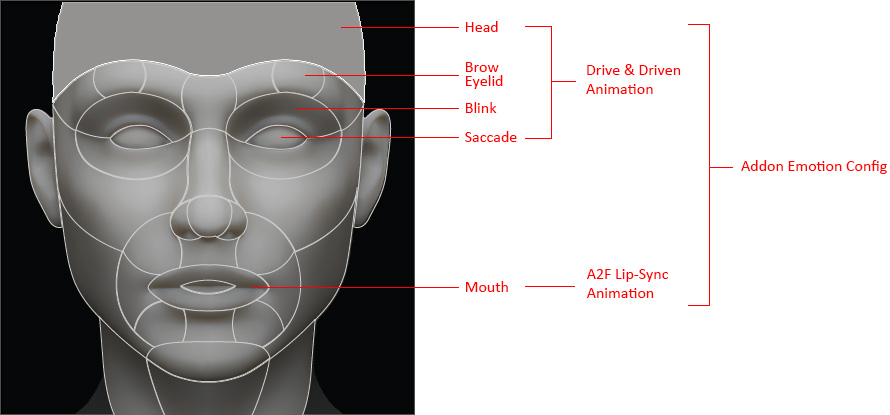
- Generate audio driven Lip-sync from lower face (mouth) by taking advantage of the ACE A2F (Audio2Face) technology.
- Implement the Drive and Driven animation from head and upper face (brow, eyelid, blink, saccade) for specific moods. These facial animations can be triggered by Speech Start, Speech End, Keywords, or Pitch.
- Add custom volume controlled specific emotion configurations on driven animations for the facial parts.
The Speech Graph displays the hierarchical graph flow.
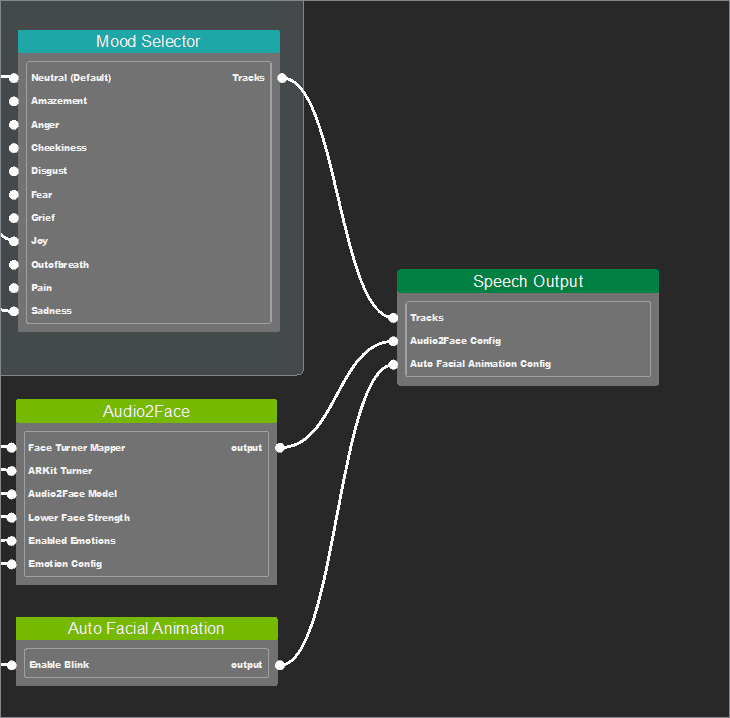
- The Drive and Driven animation are used for mood selection that connect into the Tracks input of the Speech Output.
- The audio driven lip-sync and emotion configurations connect into the Audio2Face Config input of the Speech Output.
For example, when the LLM detects joy out of a prompt, the AI Assistant system will track the mood to retrieve drive and driven animation. Then, according to the Audio2Face Config, generate AI-based lip-sync animation and add a custom emotion on the driven head, facial and mouth animations according to the volume of the final speech output.
