Head Driven Body Mocap User Interface
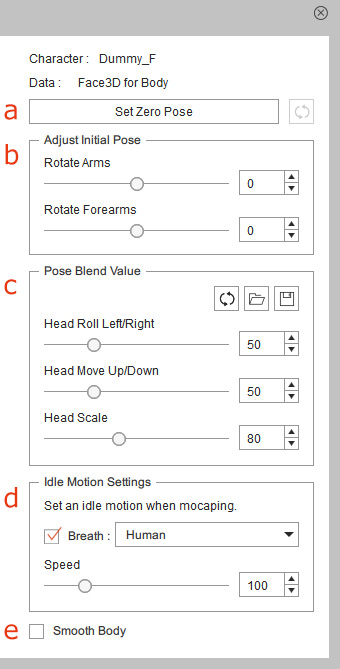
 a. Zero Pose Settings
Click the Set Zero Pose button to toggle between the gear and custom initial pose in the Preview or Record mode.
When Set Zero Pose is activated, you can click the Reset Zero Pose  button to resume from the original body pose driven by the head.
 |  |
Set Zero Pose is deactivated. | Set Zero Pose is activated. |
The Zero Pose settings work for the current character only, and therefore you may have to configure the Zero Pose settings for each character on the Character List.
b. Initial Pose Settings
Drags the sliders to adjust the initial position of the arms and forearms. You can calibrate the body pose or even add special arms animation to the character during the mocap. Please refer to the Initial Pose Correction section for more information.
c. Pose Blending Settings
Use the sliders to control the signal input strength from the head movements. You can stylize the body movements to the personality of the character or enhance the facial expressions in a motion session. Please refer to the Head Driven Body Movements section for more information.
d. Idle Motion Settings
Activate the checkbox and choose a suitable Breath template from the drop-down list to blend the idle motion into the facial motion capture.
You can drag the Speed slider to adjust the breathing speed for different scenarios.
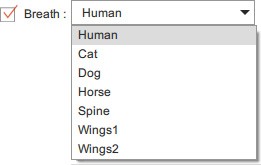
Please refer to the Blending Idle Motions section for more information.
e. Smooth Body
Activate this checkbox to make the head driven body movements even smoother.
