Generated Skin
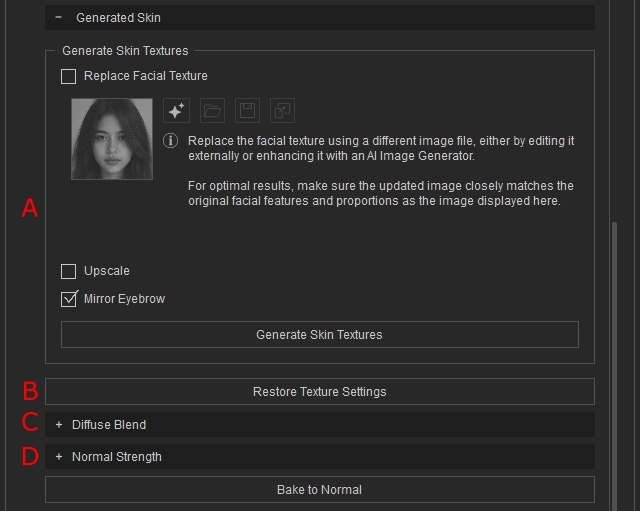
This section holds settings that directly affect the Photo Diffuse map and Normal map. The main functions here are to upscale photos with AI, repair defects, fix texture with extreme lighting using DeLight, fine tune redness effects, and fixing uneven normal strength.
All functions in this section are AI-powered. Because textures are regenerated after each modification, processing time is longer than standard texture updates. For this reason, instead of using Update Skin Texture or Auto Update, each function provides its own dedicated Update button.
Generate skin Photo:
- Replace Facial texture:
When checked, enables the function of changing the source image for texture updates. Allowing the change of texture maps without regenerating the whole character. For more information on replacing Textures, Please refer to the page Replacing Facial Texture.

- Upscale:
When checked, all texture maps including diffuse , normal, roughness maps will be upscaled with local AI, and can be used to increase the overall resolution and sharpness of the texture maps. This is useful especially for enhancing textures below 1K resolution.


Texture before Upscale
Texture after Upscale
- Mirror Eyebrow:
This option is useful when you want to keep the original eyebrow but one side contains defects (for example, being partially obscured by hair or shadows).
When enabled, the system automatically detects the more complete eyebrow and mirrors it to the opposite side, ensuring symmetry and visual consistency.


Mirror Eyebrow = Disabled
Mirror Eyebrow = Enabled
-
Generate Skin Photo: Click to start generating the Skin Textures based on the selected options above.

- Restore Texture Settings: Restores the Diffuse Blend and Normal Blend textures for previously saved characters so their blend images display correctly. Newly generated characters without previous generation do not require this step.

Diffuse and Normal Photo Enhancement:
- Diffuse Blend: This section modifies the diffuse map generated, controls De-Lighting and Skin Redness.

The following is a video showcasing how de-lighting and skin redness affects the diffuse map. - Normal Strength: This section modifies the normal map generated. Fixing uneven normal strengths.

- Overall Normal adjustment:
- Primary Normal: Affects the coarse normal strength.
- Secondary Normal: Affects the fine normal strength.


- Regional Normal adjustment:
- Eye: Affect the normal strength within the corresponding area.


-
Nose: Affect the normal strength within the corresponding area.


-
Mouth: Affect the normal strength within the corresponding area.


- Forehead: Affect the normal strength within the corresponding area.


- Eye: Affect the normal strength within the corresponding area.
- Overall Normal adjustment: