Creating AI Actors (v1.1)
AI Actors help maintain a consistent character appearance across different scenes and outputs while allowing variations in pose, mood, and environment.
Each AI Actor includes character reference images and an appearance prompt that define the character's render style and visual appearance for consistent use across AI tools.
AI Studio provides two AI Actor creation modes: Basic and Advanced.
The main difference is the level of control over the AI Actor Sheet.
| Basic Mode (v1.1) | Advanced Mode | |
Usability | Faster, easier, and more cost-effective. Use a single image to automatically generate the AI Actor Sheet. | More flexible and controllable. Provide specific images for each view. |
Best For | Quick AI Actor creation with minimal input. | 3D character-to-AI Actor conversion with precise view control. |
Control | Less control over the exact views. AI automatically determines the views, which may vary or occasionally include duplicates. | Greater control over the exact views, including facial expressions, using all 14 images. |
Customization | Limited. Adjust or replace the entire AI-generated character sheet. | Adjust or replace individual angle images in the character sheet. |
Input | Provide a few character images without requiring precise angles. | Use images automatically captured from 3D content or import your own images. |
Reference Images:
| Reference Images:
| |
Appearance Prompt:
| Appearance Prompt:
|
Basic Mode (v1.1)
The Basic mode provides a simplified way to create a custom AI Actor using a small number of actor reference images.
AI Studio uses the provided references to generate a complete AI Actor Sheet.
You can then provide an appearance prompt to define the actor's visual characteristics and help maintain a consistent and distinctive appearance across different scenes and outputs.
The selected AI model uses the generated AI Actor Sheet and appearance prompt to maintain character continuity while generating variations in pose and environment.
See also: Tutorial - Create Custom AI Actors with Create Actor Basic Mode
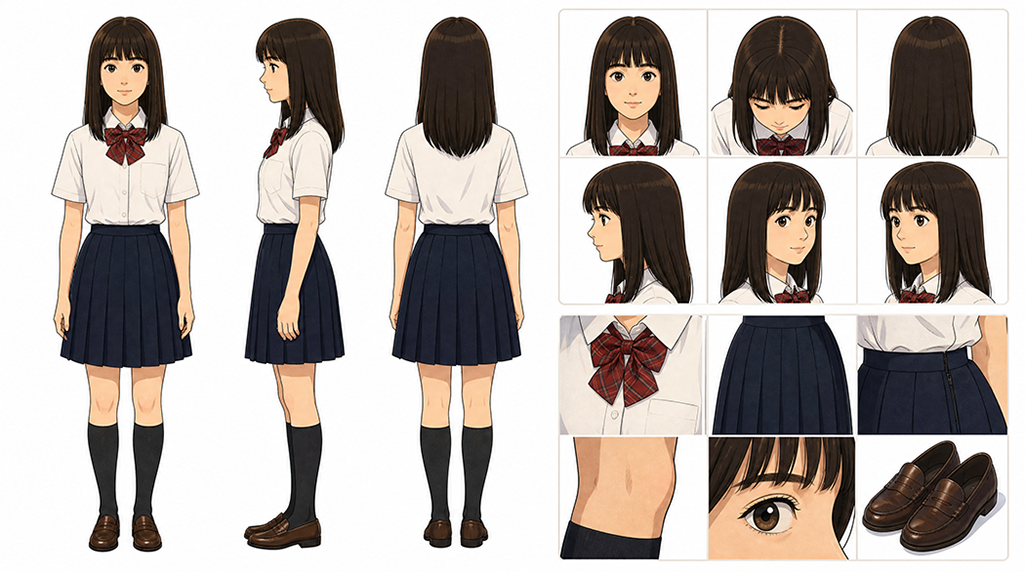
For the detailed workflows:
- Creating AI Actor – Basic Mode: Actor Images: Uses one or more actor-angle images to generate a 3-view AI Actor Sheet.
- Creating AI Actor – Basic Mode: Custom Character Sheet: Uses an existing character sheet to create the AI Actor.
Advanced Mode
The Advanced mode creates a custom AI Actor from images captured from 3D characters or imported image files.
AI Studio uses the provided images to generate precise angle views and facial details of the actor while maintaining a consistent visual style for the AI Actor Sheet.
You can then provide an appearance prompt to further define the actor's visual characteristics and maintain a consistent and distinctive appearance across different scenes and outputs.
The generated angle views and facial details, together with the appearance prompt, help the selected AI model maintain character continuity while generating variations in pose, mood, and environment.
See also: Tutorial - Create Highly Consistent AI Actors
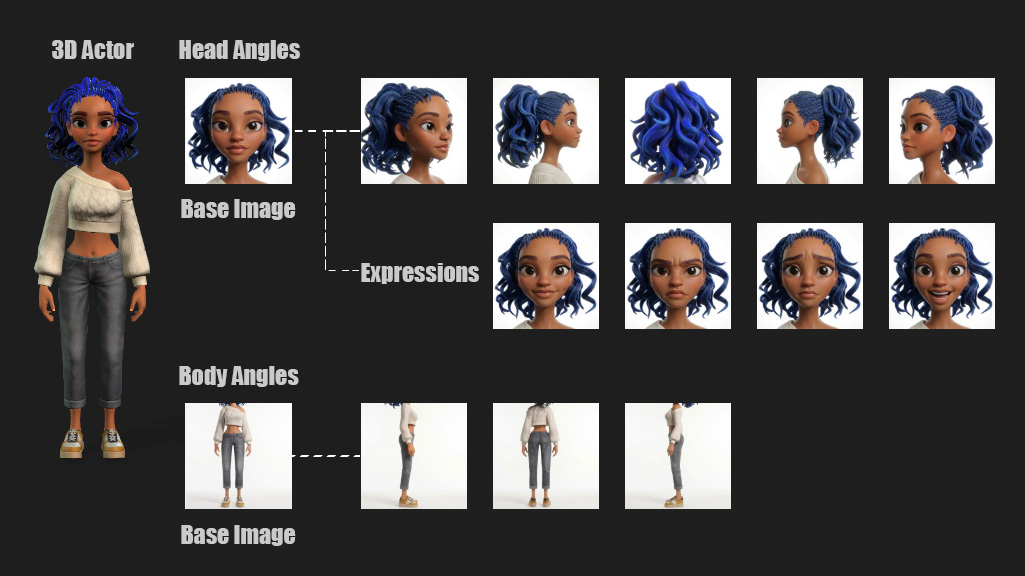
For detailed workflows:
- Advanced AI Actor Creation – Start from 3D: Recommended for obtaining a complete set of 14 character angle images by automatically converting existing iClone or Character Creator characters. The set includes detailed head close-ups, facial expressions, and full-body views for generating the AI Actor Sheet.
- Advanced AI Actor Creation – Import Images: Manually provides selected angle images for the AI Actor Sheet. At minimum, the two base images—Head and Body—are required.
- Advanced AI Actor Creation – Import Folder: Batch-imports character images. Name the angle images according to the specified naming conventions so that AI Studio automatically assigns them to the corresponding angle image slots.
