User Interface Introduction for MD Behavior - Data Settings
If iMD data has been applied to the character, then you can switch to the Data Settings tab in the MD Behavior panel to set the initial mode, speed and mixer motions, as well as properties for each speed and the blend time for different speed.
How to launch MD Behavior panel?
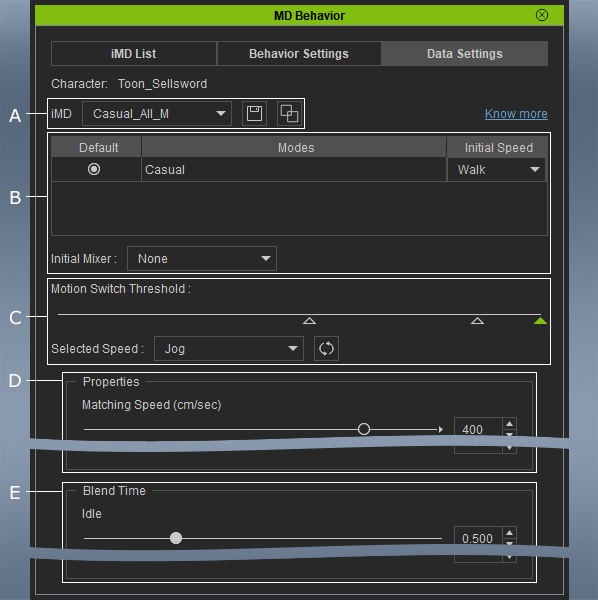
 A. iMD Data
Use the drop-down list to change to different iMD Data that have been applied on the selected character. You can also click the floppy disk button to save the adjustments set in Behavior Settings and iMD Data Settings tabs.
You can even merge iMD data with the Expand iMD button.
B. Mode List
Choose the initial mode, speed and mixer motions via these settings.
C. Speed Levels
- Click the triangles or the Select Speed drop-down list to choose the speed levels for setting properties and blend time.
- Click the Reset Data button to reset the values of the settings in the Properties and Blend Time sections.
D. Properties
Use the settings under Properties to set the Matching Speed, Smoothness / Responsiveness, Turn Rate, Turn Trigger / Angle and Time Horizon.
E. Blend Time
Use the settings under Blend Time for smoothing the transition motions between Idle, Move, Perform, Mixer / Sub-Mixer and Transition.
