Importing Videos
The source material for Video Mocap can be extracted from recorded footage, reels or videos on the internet. Video Mocap is relatively lenient with various video formats and durations.
Supported Video Formats
*.avi, *.flv, *.m4v, *.mkv, *.mov, *.mp4, *.mpeg, *.ogv, *.webm, *.wmv, *.3gp, *.asf, *.dv, *.mxf
Supported Video Length
- Video Duration: 1 second to 15 minutes
- Processing Duration: 1 to 60 seconds
Supported Video Count
- Task Queue: Max 100 videos
- Motion Generation: Max 10 videos
Supported File Size
Max 400 MB per video file.
Supported Resolution
- Min 720p or higher recommended.
- Max 4K resolution or higher is acceptable, but not recommended due to potential performance issues.
Read the Video Guidelines and import your videos using either of the following methods:
- Click the + Add Video button, and select the target videos from the destination folder.
- Directly drag the video files into the panel.
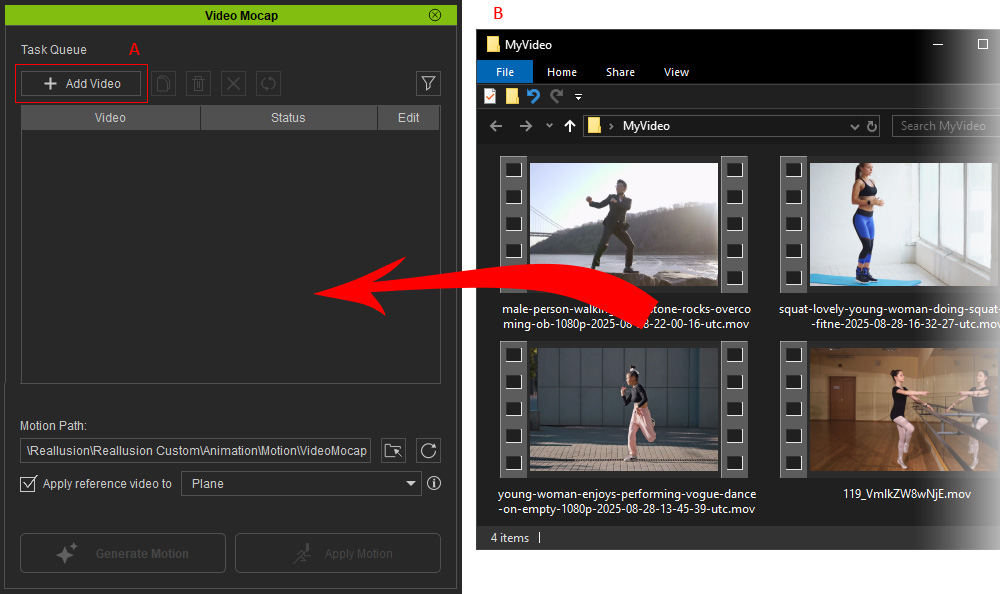
The imported videos will appear in the Task Queue with thumbnails and names.
Hover over a thumbnail to enlarge the image, check the task status for import results, or manage these tasks for further editing.
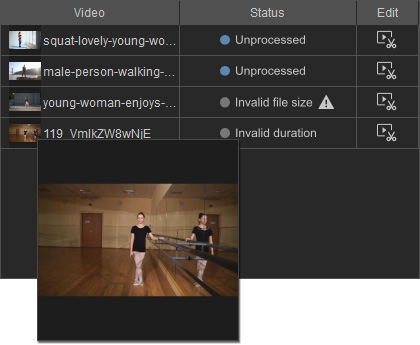
Status | Description | Follow-up Actions |
Unprocessed | Video imported successfully, unedited. | Starting status: You can preview and trim the video for motion generation with the built-in Edit Video panel. |
Invalid duration | Video length over 60 seconds. | Videos that exceed this length will be trimmed to the first 60 seconds, otherwise the video cannot be submitted for motion generation. Trim the video with external video editor and try again, or trim the video to a length under 60 seconds using the built-in Edit Video panel. |
Invalid file size | The video file size is too large (over 400 MB). | Oversized files will have their bitrates reduced. If the file size is still over 400 MB after the reduction, you can rescale, compress, or trim the video and try again. |

Next, proceed to preview the imported video and determine the processing region with the Edit Video panel.
