The Application Templates currently provides four scenarios for you to choose the one that best fits your web page needs.
The four scenarios are:
- Slide Show Playback: This template is very useful for whenever you need an actor to guide audiences through a series of custom items that you wish to present.
- Sending E-mail: If you wish to add a virtual host beside your email-sending pages, then you may embed this template. By prompting voices and expressions, the audiences do not need to read lots of texts in order to send you their feedbacks.
- FAQ: This scenario is suitable for a web site that provides frequently-asked-question features to interact with audiences.
- Quiz: You are able to use this template for constructing a quiz web site. It not only interacts with the audiences, but also scores the quiz.
By adjusting the UserSetting.js files in the folders of the desired Application Templates, you can customize these template to an ideal appearance and embed the results into your own pages to interact with your audiences.
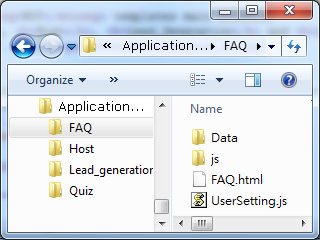
The codes in the UserSetting.js are divided into three sections:
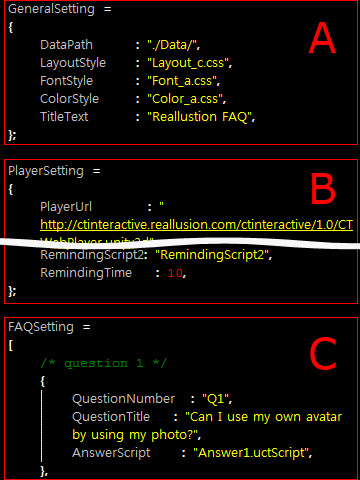
- General Settings: The settings in this section determine the layouts, the font styles and the background colors.
- Web Player Settings: In this section, you are able to define the address of the player, the actor and its idle motion, the look-at settings for the actor, the background images, the scripts the actor is about to use and any setting that is related to the web player itself.
- Individual Settings: This section is used to designate the expandable items including the captions and the scripts. Please note that there may be more than one section after this one in accordance with the characteristics of the Application Templates.