Browsing Content 
The Recommended page opens by default when you launch Smart Search, providing quick access to New Releases and Best Sellers from the Reallusion Content Store. Click Recommended beside the search bar at any time to return to this page and browse recommended content packs. You can also click a category button on the left to browse content by type, or enter keywords in the search bar to search for content using Deep Search or Keyword Search.
User Interface Introduction
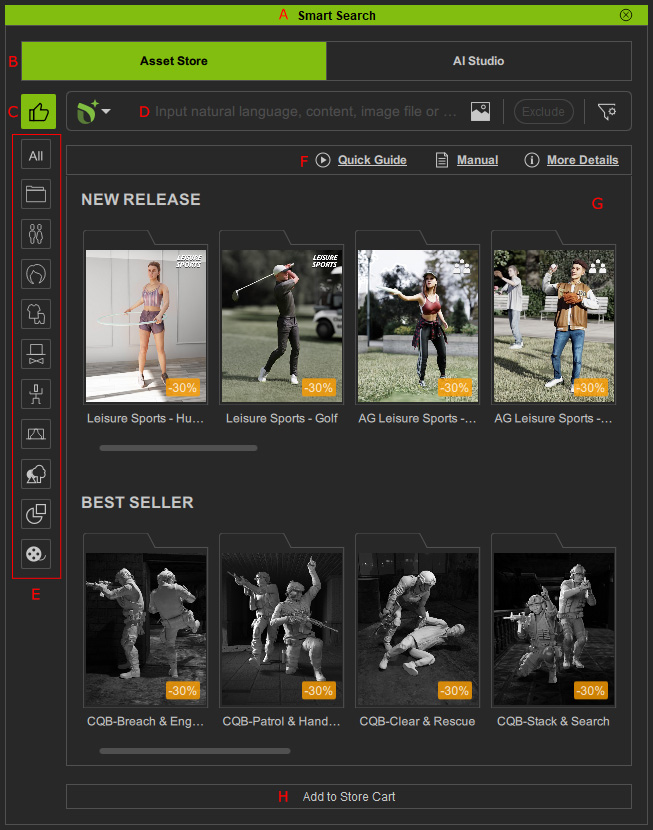
-
 Dock / Undock
Double-click on the caption to dock or undock the panel.
-
Feature Tabs
Use the tabs to switch between 3D Content and AI Studio content.
- Asset Store tab: Displays 3D content available for purchase in the Reallusion stores.
- AI Studio tab: Displays over 5,000 content items that are not available for purchase in the Reallusion stores and are intended exclusively for use in AI Studio. Access to these assets requires an AI Service subscription. For more information, refer to the AI Studio Online Manual.
-
Recommended
Click to view the recommended packs from the Content Store. Available only under the Asset Store tab.
-
Search Field
Use the drop-down menu to switch between Deep Search, an AI-driven semantic search, and Keyword Search, a traditional keyword-based search.
Deep Search

- d1. Search Method: Switch to Deep Search for AI-driven semantic search.
- d2. Search Field: Enter natural-language descriptions or phrases, or upload images to search for specific content.
- d3. Image Search: Upload, drag and drop, or copy and paste an image to search for content with a similar mesh appearance.
- d4. Exclude: Add exclusions during a search session to filter out unwanted content and narrow the search results.
- d5. Filter: Apply filters to search specific stores or refine the search criteria. Available only for 3D content under the Asset Store tab.
Keyword Search

- d1. Search Method: Switch to Keyword Search for traditional keyword-based searches.
- d2. Search Field: Enter keywords to search for desired content.
- d3. Filter: Apply filters to search specific stores or refine the search criteria. Available only for 3D content under the Asset Store tab.
Refer to the Deep Search or Keyword Search section for more information.
-
Category Buttons
Click these buttons to view the search result in all or specific content category.
-
Help
Provides quick access to resources for learning how to use Smart Search.
- Quick Guide: Opens a video demonstrating how to use Smart Search.
- Manual: Opens the Smart Search Online Manual.
- More Details: Opens the official Smart Search product page.
-
Content List
Displays the recommended content from the Content Store. Use the scrollbar or mouse wheel to browse more content.
- NEW RELEASE: Displays newly released packs from the Content Store.
- BEST SELLER: Displays best-selling packs from the Content Store.
-
Add to Store Cart | Install Content | View Items | Apply
This button is subject to change for the selected content.
- Add to Store Cart button: Launches the online store website and adds the selected packs or single items to shopping cart for checking out.
- Install Content button: Installs the selected content.
- View Items button: Opens the currently selected downloaded pack in a new tab to display its contents.
- Apply button: Applies the selected item to the viewport.
