


Launching Content Manager
The Smart Content Manager is a whole new gallery system which integrates the Item View and Pack View of Template content together with your custom creations.
You can click Window > Content Manager from the main menu or press F4 to bring up the Content Manager panel.
( Watch Tutorial - Getting Started with Smart Content Manager )
Click Start to connect to the online content server and automatically download the free resource packs.
When launching from the Smart Search panel, the free resource packs must be downloaded manually.

 Content Manager in Cartoon Animation 5
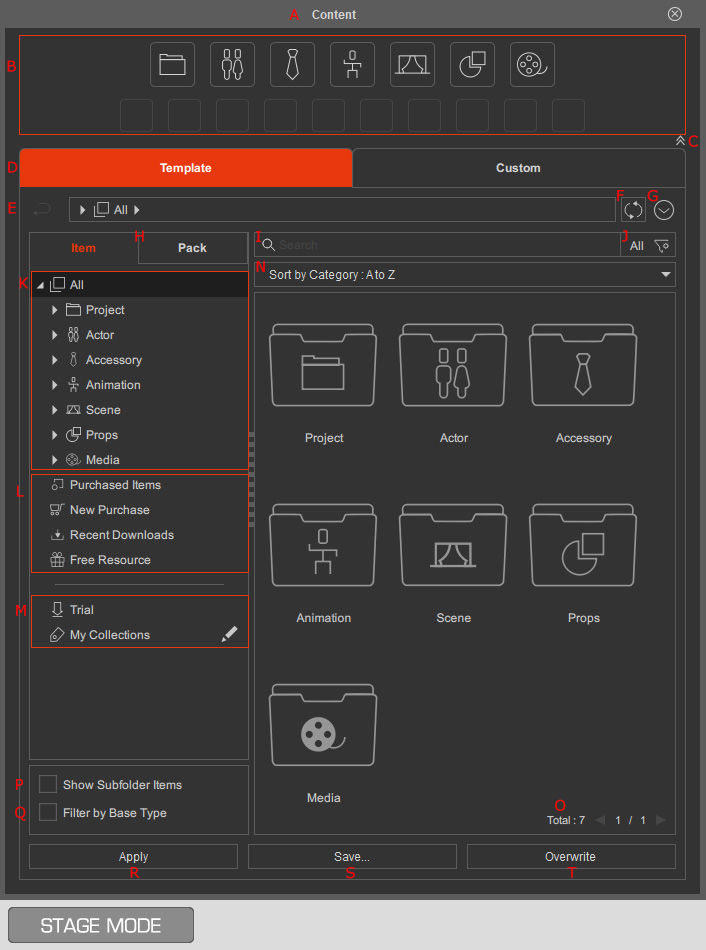
* The GUI theme can be altered under the Interface tab of the Preferences panel.
A. Dock / UndockDouble-click on the caption to dock the panel to the docking area or undock the panel and make it float above the main window.
B. Category ButtonsThese buttons can quickly switch to the desired category node in the tree-view.
C. Show / Hide Category ButtonsClick on the button to show / hide the Category Buttons.
E. Smart Search 
Click the Smart Search icon to open the Smart Search panel and browse content from various online stores using advanced AI-powered search.
F. Content Store Click the Shopping Cart icon to open the Reallusion Content Store in your browser and explore 2D and 3D branded content packs to expand your asset library.
G. Navigation Bar 
This bar contains the Back, Forward, Upper Level buttons and the content location and folders by hierarchy. Click the folder name in a higher level can quickly switch the content view back to the parent level. Click the arrow button in the field to list all content folders at the same level to quickly switch between folders.
H. Refresh- Click the Refresh
 button under the Template tab to manually synchronize the purchased online content and the local database.
 - When the Auto-sync Custom Folder is disabled in Content Manager Settings, click the Refresh Custom
 button under the Custom tab to manually synchronize the custom content with the files in the Windows File Explorer.
J. Switch Group The Switch Group drop-down list lets you switch the Content Manager view between purchased content, content subscribed to through an AI Service Plan, and content shared by a selected working group with the current account.
Select an option to switch the content view:
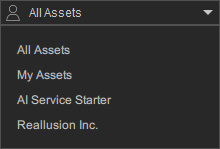
- All Assets: Browse all assets, including free assets, purchased assets, content available through your subscribed AI Service Plan, and content shared by joined working groups.
- My Assets: Browse free assets and assets you have purchased.
- AI Service Starter | Standard | Pro: Browse free assets and content available through an AI Service Plan subscription.
- [Workgroup]: Browse free assets and content shared by the selected working group.
K. Search FieldType in keyword(s) to search for specific content.
L. Search FilterClick this button to filter the content by installation status, name, author, tag or collection.
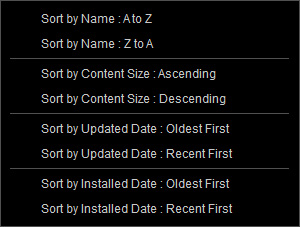
 N. Sorting Options
- Shows different sorting methods in the drop-down list.
- In the Pack view, an additional Recent Packs button will display the currently opened packs.

O. Category Tree ViewClick to show all or a specific content category.
Q. Miscellaneous NodesSelect either of the nodes to show content for different purposes.
R. Show Subfolder ItemsActivate / deactivate this checkbox to show / hide the items in the subfolders.
S. Filter by Base TypeActivate this checkbox to ensure the contents displayed are suitable and compatible for the current selected character.
T. Page Number FieldClick on this number to enter the numeric edit mode for typing in the page number and quickly displaying the contents in the page.
U. Apply | View ItemsThis button is subject to change under different conditions.
- Apply button: Click this button to apply a selected item to the target object in the viewport.
- View Items button: Click this button to show all the items inside of an installed pack, or enter a subfolder.
V. Save...Click this button to save an object into a desired custom folder.
W. OverwriteClick this button to overwrite the selected item in the custom folder with the picked object.
