


Preference Panel
You can access the Edit > Preference command from the
main menu bar or use Ctrl+P to display the Preference panel.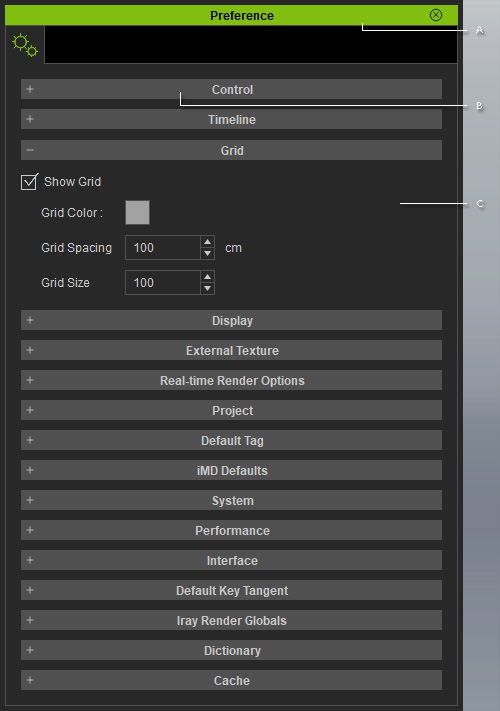
 A
A
Double-click on the caption to dock the panel to the docking place, or undock the panel and make it float above the main program.
B
There are eleven sections included in the panel.
You may expand or collapse each section by clicking the
+/- symbol.
- Control section: Defines the object snap method in the scene, show/hide the transform gizmo, and enable/disable motion clip auto-play and file compression.
- Timeline section: Adjusts the settings for the Timeline.
- Grid section: Adjusts the grid settings, including visibility, color, spacing and size.
- Display section: Shows/hides FPS information, world axis, dummy object and polygon count on the 3D viewer.
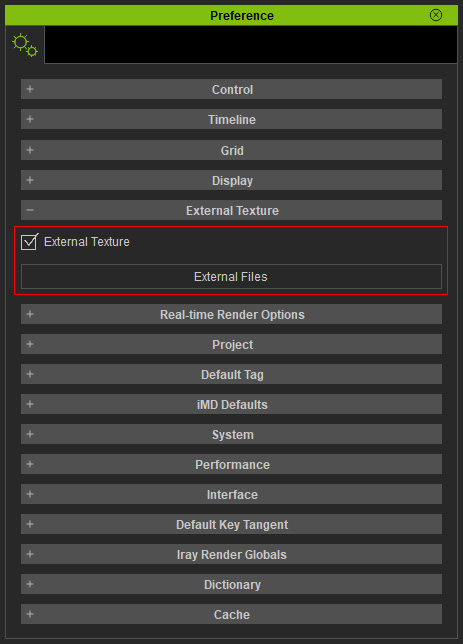
- External Texture section:
Enables/disables external texture settings and shows the paths of the external texture files in a log.
- Real-time Render Options section: To determine the render quality in the preview window, and switch on/off the LOD effect.
- Project section: Finds the default project and resets to the factory-default project.
- Default Tag section: Tags are used to identify the characters. The default tags are all listed in this section. You are allowed to add custom tags into the list as well.
- iMD Defaults section: When beginning a Motion Director session, characters lacking iMD data will automatically receive default settings from this section, based on their assigned tags.
- System section: Set the number of undos, determine the temp folder for saving temporary files, and assign the external image editor for modifying texture images.
- Performance section: Lets you author the project before all textures are loaded.
- Interface section: Used to change the appearance of the user interface, such as the icon and font sizes and the color theme of the main program.
- Default Key Tangent section: Sets the default transition curve for all motions and animations.
- Dictionary section: Dictionary definitions for the Acculips feature.
- Cache section: In order to
improve system performance, the cache is available to store
loaded textures, iMDs and motions.

C
The adjustable parameters associated with the current project.
