Video Mocap Workflow

iClone Video Mocap adopts an AI-powered advanced video-to-motion generation process that cuts down on production time and costs by bypassing the use traditional mocap devices. The following diagram illustrates how to generate motion from a video and convert it to Reallusion motions applicable for humanoid iC/CC characters.
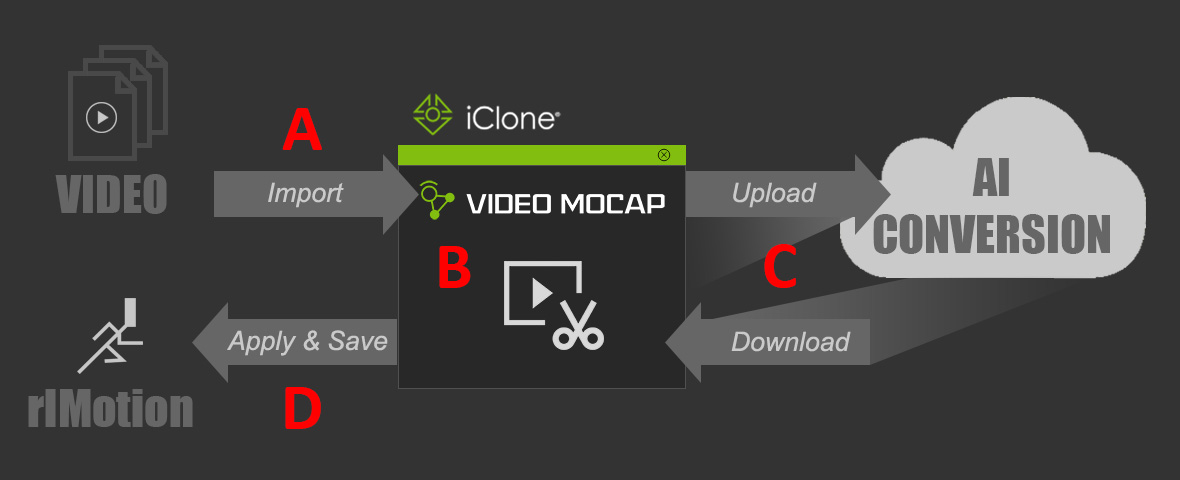
Steps

Description

Explore Sections

A

Import Video(s)

  • Imports videos to the task queue of the iClone Video Mocap plug-in.
  • For more information, read the Video Guidelines.

B

Edit Video

  • Used to preview the imported video, determine the processing region, and choose the target actor for motion capture.
  • Also used to select the tracking body part to create full body motion, or upper body motion with hand gestures.

C

Generate Motion

  • Pay the DA points to proceed to the motion generation process from uploading the videos for AI conversion to downloading the converted motions.
  • Pay-per-use: 250 DA points per task (100 points equals US$1.00). Tracking one single actor per task.

D

Apply Motion

  • Saves the converted rlMotion to the custom library and apply it to the character.
  • Outputs a source video reference for motion comparison and guided editing.