FashionGen Workflow

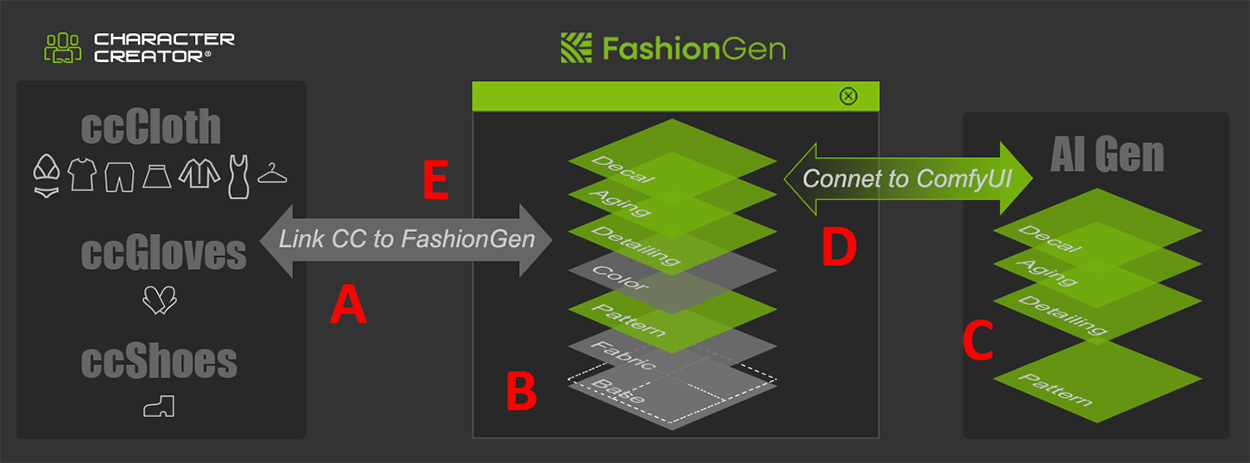
Character Creator FashionGen provides an AI-assisted texture generation workflow that allows users to efficiently edit Smart Cloths. The diagram below illustrates how to create custom patterns, decals, details, and aging effects using FashionGen, then send them back to Character Creator (CC) for further editing and rendering.
See also: Tutorial - Getting Started with FashionGen
Steps

Description

Explore Sections

A

Send to FashionGen

  • Send a single CC item (ccCloth, ccGloves, or ccShoes) to the FashionGen plugin to establish the link for texture generation and application.

B

Defining the Foundation
(Fabric / Pattern)

  • Use Color IDs to assign specific fabrics to defined mesh regions. (Explore Smart Clothes)
  • Explore the content library to choose major Fabric textile types (e.g., Denim, Silk, Wool).
  • Use the Palette Sampler to apply a color scheme to all texture layers simultaneously.

C

Generate Textures with AI
(connecting to ComfyUI)

  • Fabric / Pattern: Produce seamless textures with distribution control and organic motifs.
  • Detailing: Paint structural details like zippers, seams, and creases directly onto the fabric using the Mask brush.
  • Aging: Automatically generate curvature-based edge wear, such as stains, dirt, and mud, from the 3D mesh data.
  • Decal: Import PNGs for logos, team badges, totems, or text elements with automatically generated PBR materials.

D

Edit Textures

  • Use the Stamp Tool to project custom patterns onto the item at cursor-specified locations.
  • Generate the Normal map to define the surface details.
  • Generate the PBR map to simulate how the material would appear in the real world.
  • Blend the selected texture into the underlying layer to achieve more natural results.

E

Send to CC

  • Keep the editing layers and sends the asset to CC to create a master version that remains fully re-editable in FashionGen. File size may become large depending on the number of layers.
  • Flatten the editing layers and sends the asset to CC to generate a lightweight version optimized for character animation. Can be upscaled to increase texture resolution.